Hisense TV Remote
- 3.9
- Rating
- 100.00K
- Installs
- Free
- Price
 Analysis by App-foxy
I usually think of a phone remote as a small convenience rather than a must-have app, but Hisense TV Remote makes sense when the original controller is missing, unreliable, or simply never within reach. It is a House & Home app from Mobile Tools Shop that turns a compatible phone into a way to control a Hisense television. I found its appeal easy to understand: instead of searching between sofa cushions or getting up to change something, I could try using the phone already in my hand.
That convenience comes with an important decision, though. A phone remote is only useful if it communicates properly with the television and feels dependable during ordinary use. I would not choose this app just because it has the word “Hisense” in its name. I would choose it after considering how often I need a remote, whether my phone is a practical controller, and whether I am comfortable with the limitations that come with replacing a dedicated device.
What I would check before relying on a phone remote
The first question is compatibility in the real world. The app is designed for Hisense TVs, but a television brand alone does not guarantee that every model, connection method, or phone setup will behave identically. Before treating it as my only controller, I would install it while keeping the original remote nearby. That simple test avoids the frustrating situation of losing access to basic controls before knowing whether the app works well with a particular television.
You May Also Like

 Blood Strike: 2.5 Anniversary
Blood Strike’s Loadouts Turn Every Drop Into a Tactical Gamble
A close look at Blood Strike’s custom loadouts: how fast access to signature weapons reshapes its battle royale rhythm, rewards preparation, and narrows the gap between fights.

 Pandora - Music & Podcasts
Pandora’s Music Is Easy to Start, but Harder to Recover
Pandora’s strength is its low-effort path from a seed to a station. Its weak spot is how much confidence it asks you to place in connection, setup, and quiet recovery.

 8 Ball Pool
 Is Built on Rivalries, Rematches, and Routine
A close look at the rivalries, rematches, shared routines, and unanswered safety questions that turn a quick pool match into a persistent mobile community.

 Samsung Music
’s Quiet Strength Is Playing What You Already Own
Its reach comes less from spectacle than from dependable access to a personal library. That simplicity is both the app’s strongest retention engine and its ceiling.

 AccuWeather: Weather Radar
AccuWeather Review: A Quick, Clear Forecast for Everyday Decisions
For everyday plans, the best forecast is the one you can understand quickly. AccuWeather makes rain timing, radar, and local conditions easy to act on, with a few trade-offs.

 Hill Climb Racing
Why Hill Climb Racing Still Turns Crashes Into One More Run
A tiny car, a bumpy hill and one more upgrade: Hill Climb Racing keeps resurfacing because its simple chaos makes every near-miss feel personal.
More From Our News Desk
View All News


I would also consider the phone itself. A phone remote is convenient when the handset is charged, unlocked, and close by. It is less convenient when the phone is being used for a call, handed to someone else, or left in another room. A dedicated remote has one major advantage that apps cannot completely remove: it is always associated with the TV. The phone-based approach wins when I already have the handset in my hand, not necessarily when I want a permanent replacement.
The operating-system requirement is fairly approachable. The app supports Android devices running version 6.0 or later, so it can suit a range of older phones as well as newer ones. That matters if I want to turn an unused handset into a living-room controller. I would still check the app’s behavior on the exact device I plan to use, because an older phone may be perfectly compatible on paper while feeling slower or less comfortable in daily use.
There is also a practical question about payment. The app is free to install, while in-app purchases range from $0.99 to $23.99 per item. I would begin with the free experience rather than assuming that every useful control requires payment. If an optional purchase appears, I would first decide whether it solves a problem I actually have. A remote app should reduce friction, not create a new reason to manage unnecessary spending.
Its age rating is Everyone, which makes the basic idea suitable for a shared household. That does not mean every family member will prefer it. Children may find a physical remote easier to understand, while older relatives may prefer large, familiar buttons and no phone lock screen. In a mixed household, I would treat the app as an additional controller instead of immediately removing the dedicated remote.
Where the app is most useful
The strongest use case is the missing-remote scenario. Imagine arriving home, sitting down, and discovering that the television controller has disappeared under a blanket, been left in another room, or has stopped responding. If the phone is already nearby, this app can offer a quick alternative without waiting to replace the remote. That is a modest benefit, but it is exactly the kind of small problem a good utility should solve.
I also see value in households where several people use the same television but nobody wants to keep track of one shared object. A phone remote gives each person the possibility of controlling the TV from the device they already carry. That can be useful during casual viewing, especially when someone wants to adjust the television without interrupting another activity.
Another realistic workflow is using an older spare phone as a permanent controller. I would keep that handset charged near the sofa, configure the app, and reserve it for the television. This turns the app from an occasional emergency tool into a dedicated household accessory. The trade-off is that the spare phone becomes another device to maintain, so this works best for people who already have an unused handset rather than those who would buy one specifically for the purpose.
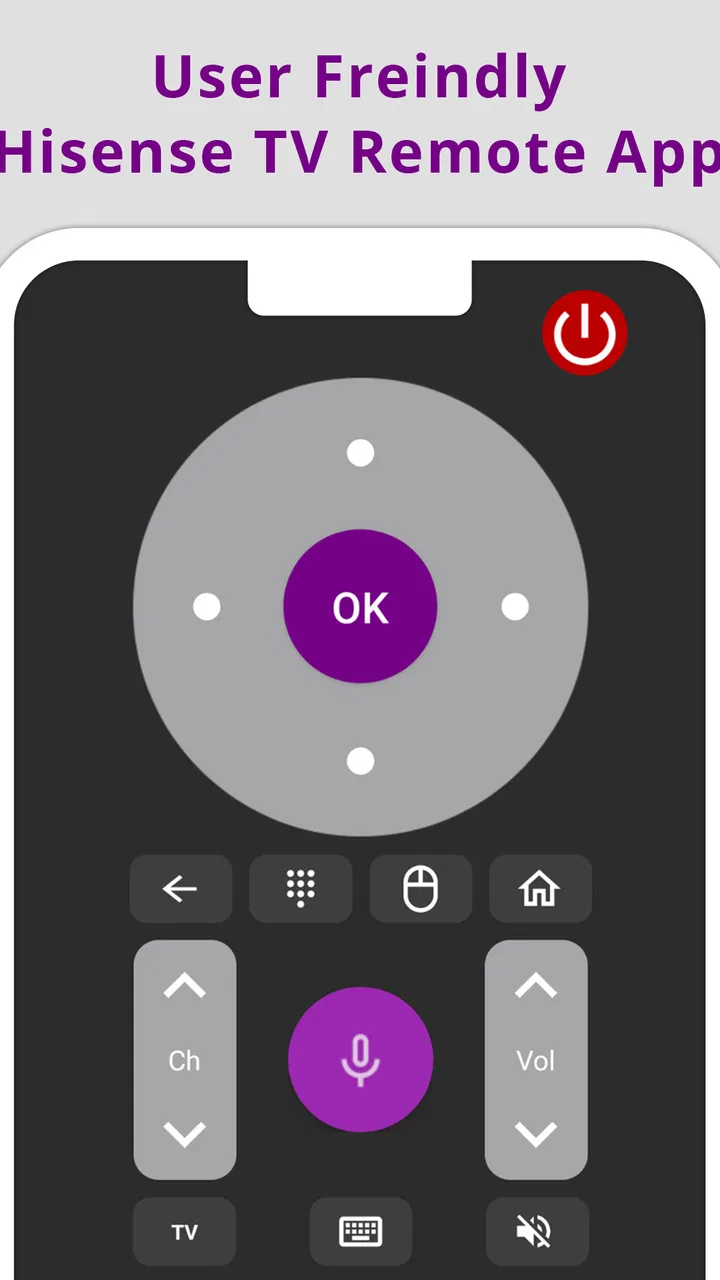
For basic television control, the app’s value is straightforward. It is aimed at controlling Hisense TVs from a phone, so I would judge it by how quickly I can perform everyday actions such as changing channels, adjusting volume, or navigating the television interface. I would not expect a phone remote to feel exactly like the original controller. Touch controls can be flexible, but they do not provide the same physical feedback as buttons, and I may need to look at the screen instead of operating by feel.
That difference becomes important in the dark. With a physical remote, I can often find the volume or navigation controls by touch after learning their positions. With a phone, I may need to wake the screen and orient myself each time. On the other hand, a phone display can make labels easier to understand than a crowded collection of small buttons. The better option depends on whether I value tactile memory or visible controls.
Small habits that make the experience less frustrating
My first tip would be to test the app from the same room where the television is normally used, rather than judging it during a quick setup beside the TV. Everyday furniture, walls, and the position of the phone can affect how convenient the arrangement feels. I would try several ordinary actions in succession, then put the phone down and pick it up again later. A remote that works once but takes too much effort to reopen is not a good daily tool.
My second tip is to keep the app easy to find. I would place it on the main home screen or in a small “living room” folder, especially if I use the phone as an emergency controller. Searching through a crowded app drawer defeats much of the benefit. If a spare phone is dedicated to the TV, I would remove visual clutter from its home screen so the controller opens with minimal searching.
My third tip is not to let the phone become the only option until I have tested the household routine. I would ask whether everyone who uses the television knows where the app is and whether they are comfortable with the phone controls. If the answer is no, the app is still useful as a backup, but it should not replace the physical remote completely. This is particularly important when guests, children, or less technical family members use the TV.
A less obvious trade-off is the phone’s competing role. The same device may receive messages, display notifications, and run other apps while I am watching television. That can make the remote convenient but distracting. If I only want to change the volume, unlocking the phone may expose me to several interruptions. A dedicated controller is less capable, but that simplicity is also its strength.
How it compares with the usual alternatives
The obvious alternative is the original Hisense remote. It remains the better choice for someone who wants immediate access without opening a phone, checking battery life, or dealing with a touch interface. It is also the safer choice for a household where multiple people need a familiar controller. I would recommend keeping it available even if this app becomes my preferred backup.
A replacement physical remote may be a better fit when the original has been permanently lost or damaged and the television is used every day. The advantage is consistency: one object can stay beside the TV, and users do not need to share a phone. The disadvantage is the effort of finding a suitable replacement and keeping another device in the home. I would choose the app first if I needed a quick solution and already owned a compatible Android phone.
Universal remotes occupy a middle ground. They can control more than one device and may suit a living room with several pieces of equipment. If I want one controller for a television, sound system, and other hardware, a universal remote could be more appropriate. This app is more focused: its purpose is controlling a Hisense TV from a phone. That focus is useful when the television is the only device I need to manage, but it may feel limited in a more complex setup.
Some users may also consider another remote application. In that situation, I would compare the actual setup experience rather than choosing by download figures alone. I would look for reliable connection behavior, controls that are easy to understand, and a payment model that feels reasonable for my needs. Hisense TV Remote has reached over one hundred thousand installs, with an average rating of 3.7 from more than eight hundred ratings and over ninety written reviews. Those figures suggest a real user base, but they also tell me to keep expectations balanced rather than assuming universal compatibility.
The app’s current version is 1.0.12mts. I would pay attention to whether it behaves smoothly on my phone and television combination instead of treating the version number as a guarantee. A newer-looking interface is not automatically better than a physical remote, and a simple app can still be worthwhile if it handles the controls I use most often without unnecessary steps.
What switching actually costs
Switching from a physical remote to a phone app costs very little money at the starting point because the app is free. The bigger cost is changing habits. I would need to remember where the app is, keep the phone charged, and accept that the controller is tied to a personal device rather than sitting permanently beside the TV. For occasional use, that cost is minor. For constant use, it can become noticeable.
There is also a household coordination cost. If one person installs the app but everyone else continues looking for the physical remote, the home ends up with two competing systems. I would explain the basic workflow to other users and decide whether the app is the main controller or simply the backup. Clear expectations matter more than the installation itself.
The in-app purchase range makes it sensible to evaluate the free portion carefully before paying. I would not purchase an item merely to unlock something I rarely use. Instead, I would identify the exact inconvenience I want to remove, then decide whether the offered option is worth it. Since the app is a utility, even a small charge should be judged against how often it saves me time.
Privacy and attention are also part of the switching decision, even without making assumptions about the app’s internal behavior. A phone remote places television control on a device that may be personal, locked, or shared. If I am uncomfortable handing my phone to someone else, a physical remote is simpler. If I prefer carrying fewer objects and already keep my phone nearby, the app becomes more attractive.
Who should use it, and who should skip it
I would recommend Hisense TV Remote to a Hisense owner who has misplaced the original controller, wants a convenient backup, or already keeps an Android phone near the television. It is also a sensible experiment for someone with a spare handset that can become a dedicated remote. The free starting point makes that test easier, and the Everyone rating suits a broad household audience.
I would be more cautious if the TV is used by people who dislike touch controls, if the phone is usually charging in another room, or if several entertainment devices need to be controlled together. In those cases, the original remote, a replacement remote, or a universal controller may be less troublesome. I would also skip making it the sole controller until I had tested it with the exact television and the people who use that TV most often.
My final recommendation is practical rather than enthusiastic: try it as a backup first. If it responds reliably in your living room and the phone interface feels natural, it can become a genuinely handy everyday tool. If it adds more steps than it removes, there is no reason to abandon a physical controller that already works. The app is most convincing when convenience comes from using a phone already in your hand, not when it forces the phone to replace a perfectly good remote.
For me, that makes Hisense TV Remote a useful, focused option rather than a universal answer. Mobile Tools Shop has built it around a clear household problem, and its free entry point lowers the risk of testing it. I would install it for emergencies and casual control, keep the original remote available, and only consider paid extras after confirming that the app fits my routine. That approach gives the app a fair chance without asking it to do a job for which a dedicated controller may still be better.
FAQs for Hisense TV Remote
01What features does the Hisense TV Remote app offer?
The Hisense TV Remote app allows you to control your Hisense TV directly from your smartphone. It includes features such as navigating channels, adjusting volume, accessing streaming services, and even using voice commands. The app also supports keyboard input for easy text entry, making it a comprehensive remote control solution.
02Is the Hisense TV Remote app compatible with all Hisense TV models?
The Hisense TV Remote app is compatible with most recent Hisense TV models, but it’s always a good idea to check the specific model compatibility on the app’s download page or the official Hisense website. Older models may not support all features, so verifying compatibility ensures the best experience.
03How can I connect my smartphone to my Hisense TV using the app?
To connect your smartphone to your Hisense TV, ensure both devices are on the same Wi-Fi network. Open the Hisense TV Remote app, follow the on-screen instructions to detect your TV, and pair the devices. This process usually involves selecting your TV from a list and confirming the connection.
04Do I need an internet connection to use the Hisense TV Remote app?
An internet connection is required to initially set up the Hisense TV Remote app and to ensure both your smartphone and TV are connected to the same network. However, once connected, you do not need an active internet connection to use basic remote functions, although some features may require it.
05Are there any costs associated with using the Hisense TV Remote app?
The Hisense TV Remote app is typically free to download and use, but it’s always good to check for any in-app purchases or premium features that might require payment. Additionally, ensure you download from the official app store to avoid any unauthorized charges or versions.
Pros
- Easy to navigate interface.
- Supports multiple Hisense models.
- Quick setup process.
- Customizable remote features.
- Connects via Wi-Fi or Bluetooth.
Cons
- Occasional connectivity issues.
- Limited advanced settings.
- Ads can be intrusive.
- Doesn't support older models.
- Requires stable internet connection.

Hisense TV Remote
Gallery